L1 for  :
:  ,
, 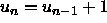 . Next, enter this system into
 L2 for  :
:  ,
,  .
Graph the resulting scatter plot.
.
Graph the resulting scatter plot.
MA 114
Nov. 30, 2001
The following instructions are for the TI-83. They explain how to use your
calculator's sequence mode to store a recursive sequence in a list. By
storing recursive sequences into L1 and L2 you can produce a
scatter plot.
Mode key. On the fourth line of the display, select
Seq.
Y= key. Enter 0 for nMin. Enter your
recursive equation for u(n).
To enter u(n-1), press 2nd then 7 for u and the
X key (to the right of Alpha) for n.
u(nMin).
2nd then
Mode to return to calculation mode.
u(0,n,1) STO L1where
u is obtained by pressing 2nd then 7, n
is the number of recursive periods (an integer value), STO is the
STO key, and L1 (List 1) is 2nd 1. Press
Enter
Note that you can store the sequence into any of the six lists.
Mode and select Func on the fourth line to return
to function graphing mode.
Enter this system into L1 for : , . Next, enter this system into L2 for : , .
Graph the resulting scatter plot.