Placement Policies, I/O
Tom Kelliher, CS 240
Apr. 26, 2000
Distribute, collect homework.
Read 8.4,5.
For those with fewer than 2 points in the bank: problem 8.25. Due in three
days.
Static placement policies, thrashing.
- Dynamic placement policies.
- Introduction to I/O system design.
Buses, interfaces.
Attempt to adapt to process behavior.
Action on memory over-commitment?
Idea:
- ``Locality.''
- Number of pages for each locality.
- This is the working set.
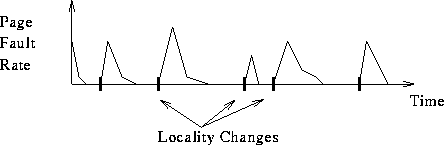
How do we determine the working set?
-
 : working set window.
-
 : working set interval.
- Every
 time units, examine last
  references and
determine number of unique references. That number is the working set
size.
references and
determine number of unique references. That number is the working set
size.
- How do we implement this?
- System daemon and timer interrupt.
- Concatenate a few reference bits.
- What happens if the window straddles two localities, etc.? (Working
set aliasing)
- Ultimate goal: maintain each process' page fault rate within some
target region.
- Implementation: Track each process' fault rate
- If above target region: allocate more frames to process.
- If below target regions: de-allocate frames.
- Implementation?
Generally, I/O is slow, relative to CPU rates. Why? (I/O often relies
upon human or mechanical processes.)
Thus, semiconductor advances don't benefit the I/O subsystem, causing it to
become the bottleneck.
An Example:
- Suppose we have a benchmark that runs in 100 s, where 90 s. is CPU
time and the rest I/O time. If CPU time improves by 50% per year over the
next five years, but I/O time doesn't improve, how much faster will our
program run at the end of five years?
- Improved CPU time at the end of one year:
 .
.
- Improved CPU time at the end of five years:

- Run time at the end of five years: 21.85 s.
CPU speedup: 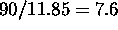 .
.
Program speedup: 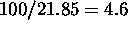 .
.
- Originally, I/O time was
 10% of the total time.
Now, it's  46% of the total.
- I/O can be:
- Local: keyboard, mouse, graphics, disk, printer.
- Remote: graphics, disk, printer, network services.
- Latency: Delay between request and first data received.
- Bandwidth: The rate at which data can be transferred.
Example 1:
- You're here in Maryland, on a T1, accessing a web page on a web
server in California.
- The files composing the web page are in RAM cache. In total, you
access 1MB of data in downloading the web page.
- What delay dominates, latency (minimally 32 ms) or bandwidth?
- Repeat, assuming you have a gigabit connection.
- Can we overcome latency?
- Hard to get around the speed of light.
- Caching data locally. Problems such as updates, validity. Does
this solve the problem? Is the problem solvable?
Example 2:
- You have a system with a 1 GHz CPU and a gigabit ethernet card.
- The ethernet card interrupts each time it receives 16 bytes.
- The ethernet interrupt handler requires executing 200 instructions.
(This is probably optimistic.)
- Do you get any work done?
- Bytes received per second: 1E8.
- Ethernet interrupts per second: 6.25E6.
- Cpu cycles spent handling interrupts: 1.25E9.
- Time spend handling one second of ethernet data: 1.25 s.
- Supercomputing: Weather forecasting. Supercomputing applications
tend to process large volumes of data, putting a premium on I/O bandwidth.
- ``Back Office'' computing: Online transaction processing.
Client/Server. This involves database operations: queries, adds, deletes,
edits. Requests from large geographical areas are aggregated at one
database server. Very large transaction volumes (airline ticketing
systems). For this reason, databases often kept in RAM (several GB of
RAM).
- e-Commerce computing: Client/Server. Client: web browser. Server:
web server (Apache, etc.) feeding dynamic HTML and data from a SQL (MySQL,
Oracle, etc.) database server. CGI used to interface the two.
Thomas P. Kelliher
Wed Apr 26 08:51:24 EDT 2000
Tom Kelliher