Chapter 3
Managing Design Processes
Outline
I. Organizational Design and Support
Usability
Design is inherently creative and unpredictable. Interactive system designers must blend knowledge of technical feasibility with a mystical esthetic sense of what attracts users.
II. The Three Pillars of Design
- Guidelines
documents and processes
Each project has different needs, but guidelines should be considered for:
• Words, icons, and graphics
– Terminology (objects and actions), abbreviations, and capitalization
– Character set, fonts, font sizes, and styles (bold, italic, underline)
– Icons, graphics, line thickness, and
–
Use of color, backgrounds, highlighting, and blinking
• Screen-layout issues
– Menu selection, form fill-in, and dialog-box formats
– Wording of prompts, feedback, and error messages
– Justification, white space, and margins
– Data entry and display formats for items and lists
– Use and contents of headers and footers
• Input and output devices
– Keyboard, display, cursor control, and pointing devices
– Audible sounds, voice feedback, touch input, and other special devices
– Response time for a variety of tasks
• Action sequences
– Direct-manipulation clicking, dragging, dropping, and gestures
– Command syntax, semantics, and sequences
– Programmed function keys
– Error handling and recovery procedures
• Training
– Online help and tutorials
– Training and reference materials
– Command syntax, semantics, and sequences
-
User interface software tools
-
Expert reviews and usability testing
III. Developmental Methodologies
The Logical User-Centered Interactive Design Methodology (LUCID) (Kreitzberg):
– Stage 1: Envision
– Stage 2: Discovery
– Stage 3: Design Foundation
– Stage 4: Design Detail
– Stage 5: Build
– Stage 6: Release
The Twelve areas of the LUCID Management Strategy
- Product Definition
- Business Case
- Resources
- Physical Environment
- Technical Environment
- Users
- Functionality
- Prototype
- Usability
- Design Guidelines
- Content Materials
- Documentation, Training, and Help
IV. Ethnographic Observation
Observation of users in work or home environment to gain insight into behavior and context.
V. Participatory Design
Controversial user involvement in the design proces
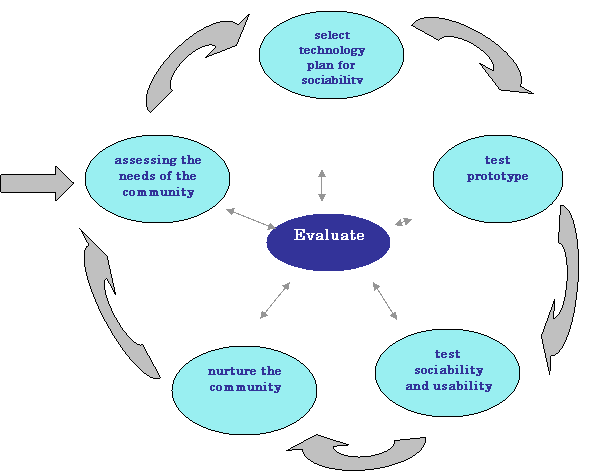
VI. Participatory community-centered
development
V. Scenario Development
Day-in-the-life scenarios:
• characterize what happens when users perform typical tasks
• can be acted out as a form of walkthrough
• useful tools
– table of user communities across top, tasks listed down the side
– table of task sequences
– flowchart or transition diagram