
testBB

cornerBB

novaBB
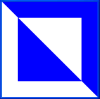
rcrossBB
Expressions, Functions and the Substitution Model
In Haskell, computation is done on expressions. Here are some examples:
3 + 4
sqrt 9.0
sqrt (3 + 6)
Note that expressions have a value and that value has some type.
3 + 4 => 7 : Int
sqrt 9.0 => 3.0 : Float
sqrt (3 + 6) => 3.0 : Float
We can define functions which take parameters of some type and return the value of an expression using those parameters. Whenever we define a function we usually declare the type of that function. That is, we specify the types of the parameters as well as the type of the returned value.
square :: Float -> Float
square x = x * xhypotenuse :: Float -> Float -> Float
hypotenuse a b = sqrt (square a + square b)
Observe that the function square takes a parameter
which is a Float and returns a value which is a Float. We denote the type
of this function therefore as
Float -> Float.
The definition specifies a parameter x, and the return value as the expression
obtained when we multiply x to itself.
Note that the
function hypotenuse takes two Floats as parameters and returns a Float. We will
discuss later why the type for that function is written so strangely as
Float -> Float -> Float.
Suppose we wish to compute the value of the following expression:
hypotenuse (3 + 2) (3 * 4)
To evaluate that expression we would simply substitute the expression definition for the function hypotenuse and replace its parameters with the values of its argument expressions:
hypotenuse (3 + 2) (3 * 4) => -- substitute into the body of hypotenuse
sqrt (square (3+2) + square (3 * 4)) => -- evaluate the arguments of square
sqrt (square 5 + square 12) => -- substitute into the body of square
sqrt (5 * 5 + 12 * 12) => -- evaluate the argument of sqrt
sqrt (169) =>
13.0
We will find this substitution model quite useful
as expressions get more complex.
Application : Manipulating Words and Sentences
We will consider an application of manipulating words and
sentences. The values of both words and sentences will be of
the type Language. We will have two constructor functions word
and sent which take a String and convert it to a Language
object.
The following is a list of operators that we can perform on Language
objects.
firstItem :: Language -> Language -- gives the first letter or word of a word or sentence
lastItem :: Language -> Language -- gives the last letter or word of a word or sentence
butFirst :: Language -> Language -- gives everything BUT the first letter or word of a word or sentence
butLast :: Language -> Language -- gives everything BUT the last letter or word of a word or sentence
item :: Int -> Language -> Language -- gives the nth letter or word of a word or sentence
count :: Language -> Int -- gives the number of letters or words of a word or sentence
(+++) :: Language -> Language->Language -- concatenate two Language objects together
empty :: Language -> Bool -- determines if a word or sentence is empty
member :: Language -> Language->Bool -- determines if a letter or word is contained in a word or sentence
wordToSent :: Language -> Language -- converts a word to sentence of one word
sentToWord:: Language -> Language -- converts a sentence to a single word
Consider the following example expressions:
word "computer" +++ word "s" => computers : Language
sent "foundations of computer" +++ word "science" => [foundations of computer science] : Language
count(butFirst (word "dogs")) => 3 : Int
Consider the following function definitions. Can you figure out what they do?
addS :: Language -> Language
addS w = w +++ word "s"thirdPerson :: Language -> Language
thirdPerson verb = sent "she" +++ addS verb
Application : Quilts
Now we will look at building expressions which are not composed of number or language objects but are instead made up of quilt images. The basic building blocks of our quilts will be predefined basic blocks of type Image.
|
testBB |
cornerBB |
novaBB |
rcrossBB |
We can manipulate blocks with two predefined operators:
quarterTurnRight :: Image -> Image -- rotates a quilt by a quarter turn right
stack :: Image -> Image -> Image -- stacks two quilts (of equal width)
We can display a quilt by using the function draw. Consider the following expressions and figure out what they will display.
draw (stack (quarterTurnRight testBB) rcrossBB)
draw (quarterTurnRight (stack testBB testBB))